In the ever-evolving world of database management, optimizing performance is crucial for ensuring efficient operations. SQL Server, a robust and widely-used database management system, offers a powerful feature called “Instant File Initialization” that can significantly enhance overall system performance. However, many database administrators overlook this feature or are unaware of its potential benefits.
What is Instant File Initialization?
Instant File Initialization is a SQL Server feature that allows for faster data and log file creation or expansion. Typically, when creating a new file or expanding an existing one, SQL Server initializes the file by zeroing out the entire disk space allocated for the file. This process can be time-consuming, especially for large files, leading to prolonged database operations and potential downtime. With Instant File Initialization enabled, SQL Server bypasses the zeroing-out process, resulting in significantly faster file creation and expansion.
Enabling Instant File Initialization
To enable Instant File Initialization, you must grant the “Perform Volume Maintenance Task” privilege to the SQL Server service account. Here’s how you can do it:
- Open the Local Security Policy editor by running “secpol.msc” from the Start menu or command prompt.
- Navigate to “Local Policies” > “User Rights Assignment” > “Perform Volume Maintenance Tasks.”
- Click “Add User or Group” and add the SQL Server service account.
- Restart the SQL Server service for the changes to take effect.


Make sure to enable it in SQL Server Configuration Manager -> SQL Server Properties -> Advanced
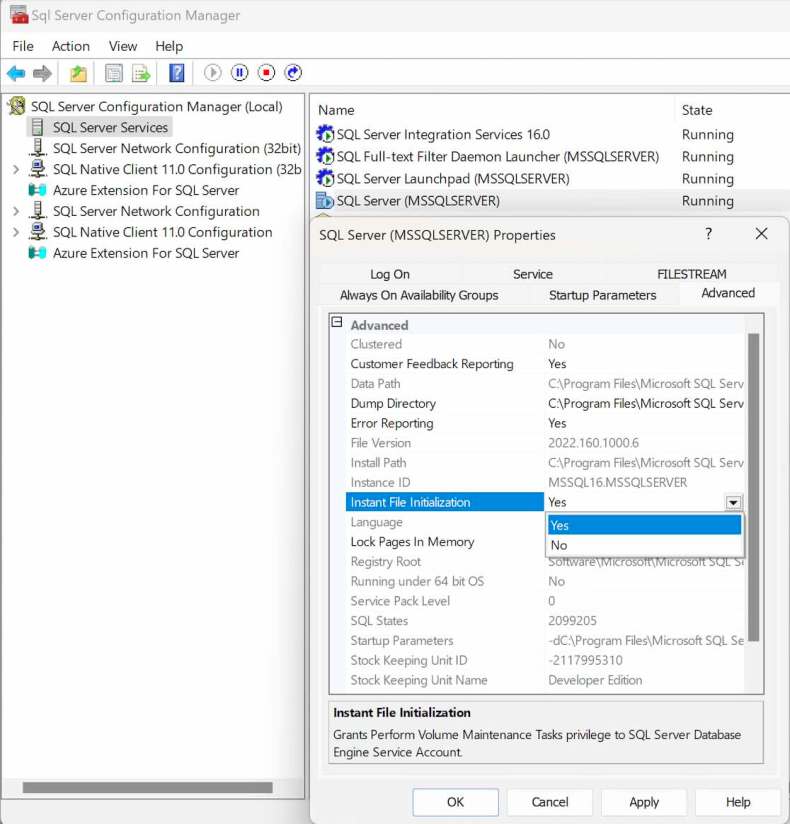
Subsequently, a restart of the SQL Server service is necessary for the changes to take effect.
You can also enable this when installing sql server.
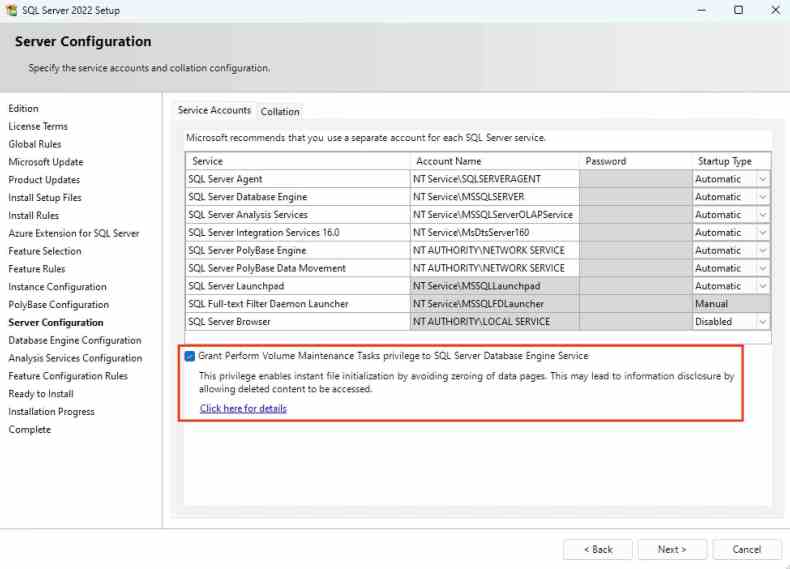
Alternatively, you can enable Instant File Initialization through T-SQL commands. First, check if the feature is already enabled by running the following query:
EXEC xp_readerrorlog 0, 1, N'Server is ready to use', N'instantly initialized'If the query returns no results, you can enable Instant File Initialization with the following command:
EXEC sp_configure 'show advanced options', 1
RECONFIGURE
EXEC sp_configure 'instant file initialization', 1
RECONFIGURE
These commands enable the “show advanced options” setting, which allows you to modify the “instant file initialization” setting, and then enable the feature itself.
Practical applications
Let’s delve into how IFI can be utilized within your SQL Server environment. Consider the scenario where you’re tasked with creating a new database or expanding an existing one. Typically, SQL Server must zero out the data file, which can be time-consuming. With IFI enabled, SQL Server bypasses this step, directly allocating the space, which results in a significant performance boost.
-- Creating a new database with Instant File Initialization
CREATE DATABASE FastDB
ON
( NAME = FastDB_Data,
    FILENAME = 'C:\SQLData\FastDB.mdf',
    SIZE = 500MB )
LOG ON
( NAME = FastDB_Log,
    FILENAME = 'C:\SQLLogs\FastDB.ldf',
    SIZE = 100MB );
Furthermore, for database administrators looking to monitor and verify the usage of IFI, SQL Server provides valuable insights through its dynamic management views. For instance, querying the sys.dm_server_services DMV can confirm if IFI is enabled for your server.
-- Checking if Instant File Initialization is enabled
SELECT service_account, instant_file_initialization_enabled
FROM sys.dm_server_services
WHERE servicename LIKE 'SQL Server (%';
Applications and Benefits
| Pros | Cons |
|---|---|
| Faster database provisioning | Requires granting additional permissions |
| Improved backup and restore operations | Potential security risks if not implemented properly |
| Enhanced performance during data and log file growth | May require changes to existing scripts or processes |
| Reduced downtime and increased efficiency | |
| Minimized performance bottlenecks |
Pros:
- Faster database provisioning: Creating new databases or adding files to existing ones becomes significantly faster, reducing downtime and improving overall efficiency.
- Improved backup and restore operations: Since backup and restore processes often involve creating or expanding data and log files, enabling Instant File Initialization can speed up these operations.
- Enhanced performance during data and log file growth: When data or log files need to grow, the expansion process is accelerated, minimizing potential performance bottlenecks.
- Reduced downtime and increased efficiency: By eliminating the time-consuming process of zeroing out disk space, Instant File Initialization can help reduce downtime and increase overall efficiency in database operations.
- Minimized performance bottlenecks: With faster file creation and expansion, potential performance bottlenecks related to these processes can be minimized.
Cons:
- Requires granting additional permissions: To enable Instant File Initialization, the SQL Server service account must be granted the “Perform Volume Maintenance Task” privilege, which may require additional administrative effort and security considerations.
- Potential security risks if not implemented properly: Improperly enabling or configuring Instant File Initialization can lead to security vulnerabilities, such as unauthorized access to uninitialized disk space.
- May require changes to existing scripts or processes: If your database environment relies on scripts or processes that assume the default file initialization behavior, enabling Instant File Initialization may require modifying or updating those scripts or processes.
It’s important to carefully evaluate the pros and cons in the context of your specific SQL Server environment, security requirements, and performance needs before deciding to enable Instant File Initialization. Additionally, it’s recommended to follow best practices and consult with experienced database administrators or refer to Microsoft’s documentation for proper implementation. You can find this comprehensive guide on Microsoft’s website here: Database instant file initialization – SQL Server | Microsoft Learn.
In conclusion, enabling Instant File Initialization in SQL Server can significantly improve performance by accelerating file creation and expansion processes. By leveraging this feature judiciously and following best practices, database administrators can optimize their SQL Server environments for enhanced efficiency and productivity.

