Introduction
If you’re running mission-critical workloads on Azure SQL Database or Managed Instance, reliable performance monitoring is a must. But deploying monitoring infrastructure and wrangling telemetry data can be complex and time-consuming. Wouldn’t it be great if you could enable in-depth SQL monitoring with just a few clicks and have all the key metrics at your fingertips? Now you can!
Microsoft recently announced (20 March, 2024) the public preview of database watcher, a fully managed monitoring solution for Azure SQL. As someone who has set up SQL monitoring many times over the years, I’m excited to see a native Azure service to simplify this. In this post, I’ll give you a tour of database watcher and share my thoughts on how it can help you keep a pulse on your SQL estate.
Easy Onboarding
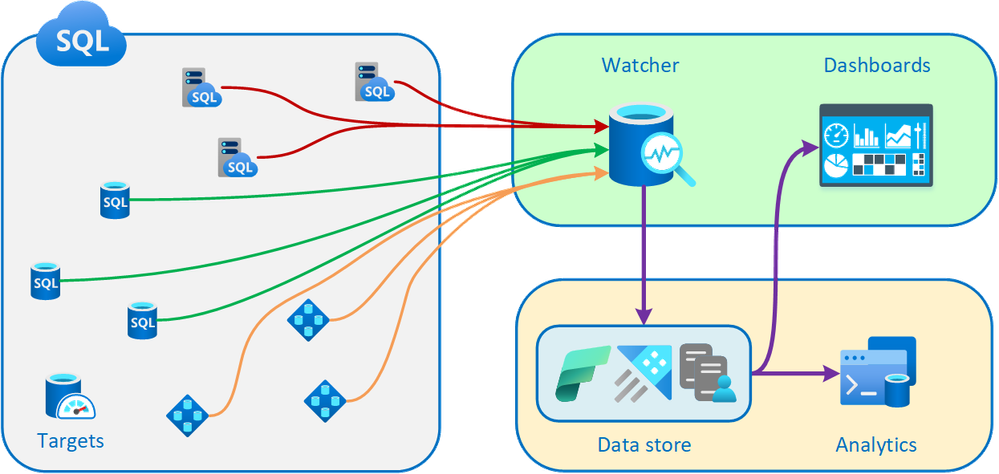
One thing I really like about database watcher is how quick it is to get started. There’s no monitoring infrastructure to deploy and no agents to install on your databases. Just go to the Azure portal, create a new watcher, and start monitoring. Within minutes, you’ll see performance data flowing in from across your SQL estate.
Database watcher automatically discovers Azure SQL databases, elastic pools, and managed instances in your specified subscription and region. You can choose which ones to monitor with a few clicks. This autodiscovery is a big time-saver, especially if you have a large or frequently changing SQL footprint.
In-Depth Monitoring
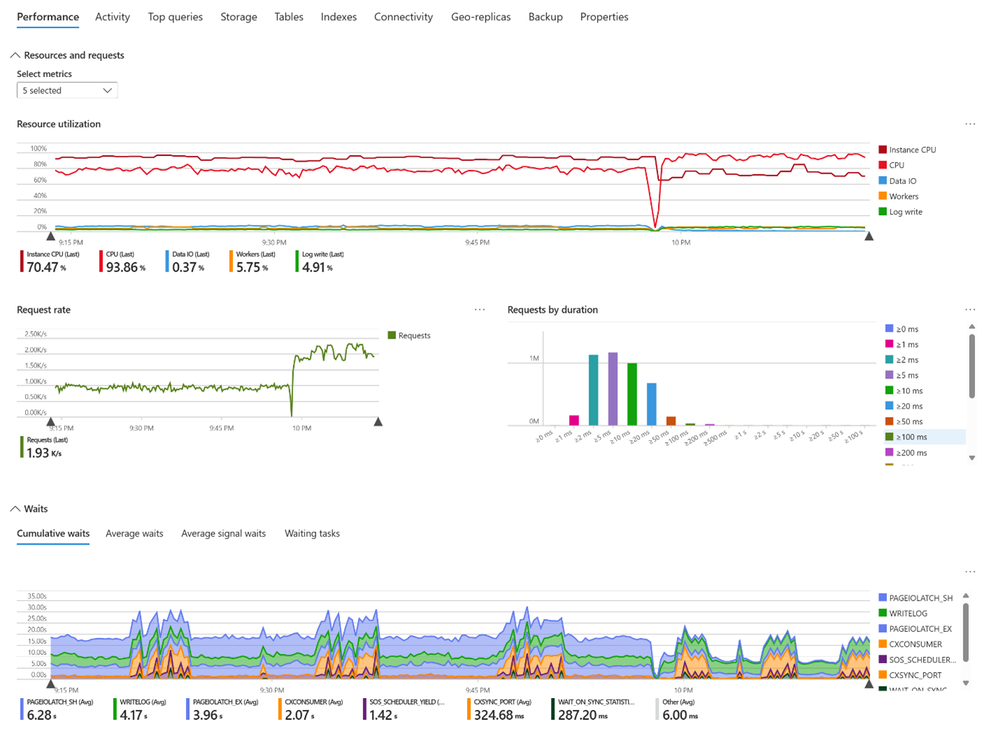
Database watcher collects a wealth of detailed metrics and telemetry, with data from over 70 SQL system views. This includes info on:
- Resource utilization (CPU, memory, I/O, etc.)
- Query performance and wait stats
- Capacity metrics like storage and database/file sizes
- Errors and connectivity issues
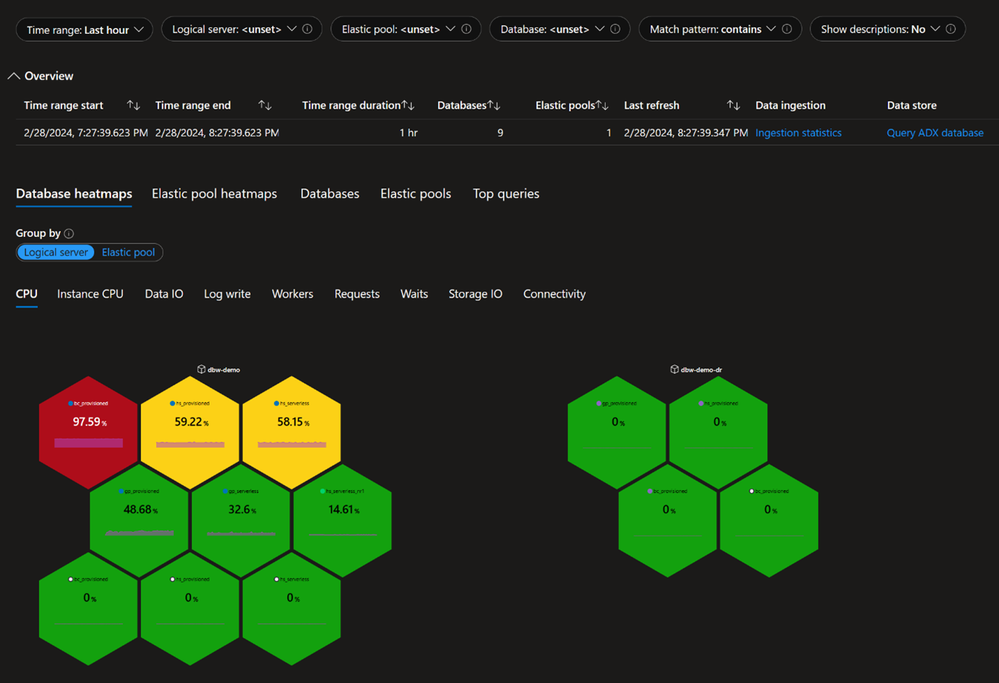
The monitoring data is centralized in an Azure Data Explorer cluster provisioned in your subscription. From there, it flows into informative dashboards in the Azure portal. You get a single-pane view of your entire SQL estate, plus the ability to quickly drill down into details for individual databases and instances.
One impressive aspect is the near real-time nature of the monitoring. When you open a dashboard, you’re seeing data that’s just seconds old in most cases. As someone used to multi-minute collection intervals with SQL Server, this low latency is a game changer for detecting and responding to issues quickly.
Flexible Analytics
While the built-in dashboards provide a great overview, database watcher also empowers you to dig deeper with custom analysis. Since the monitoring data lands in Azure Data Explorer, you can unleash the full power of KQL queries to slice and dice the metrics.
Want to analyze the top waits for your business-critical database over the past hour and correlate them with resource usage? No problem! Database watcher makes it easy to query the raw monitoring data and build your own visualizations in tools like Power BI and Grafana.
I’m also excited that database watcher will integrate with the new Real-Time Analytics service in Microsoft Fabric. This opens up even more possibilities to combine SQL monitoring data with other telemetry for holistic app and infra observability.
Looking Ahead
While the initial database watcher preview release is already very capable, Microsoft has laid out a solid roadmap of enhancements. Some key items to look forward to:
- Alerts to proactively notify you of issues
- Monitoring support for SQL Server on Azure VMs
- Management via PowerShell and CLI
- Collecting extended events (XEvents)
- Higher scale limits and more regions
I’m looking forward to seeing database watcher evolve and mature. It has the potential to greatly simplify SQL performance monitoring and troubleshooting in Azure.
Get Started Today
If you’re using Azure SQL Database or Managed Instance, I’d highly encourage you to check out database watcher. It brings a whole new level of observability to your data estate, with minimal setup and no infrastructure headaches.
To learn more, head over to the database watcher announcement
You’ll find a quickstart guide to walk you through enablement, plus info on dashboards, data analysis, and more. Give it a spin and let me know what you think! I’m excited to see how database watcher enhances the way we manage SQL in the cloud.

